

Your non-data teams or business users always have questions, which means your data team constantly has a queue that’s several weeks deep.
Databricks AI/BI Genie tries to bridge that gap by turning plain English into SQL queries, but the question worth asking is whether it actually removes the bottleneck or just moves it.
Here’s a breakdown of what Genie delivers, where it falls short, and why a different model might serve your team better.
What is Databricks AI/BI Genie?
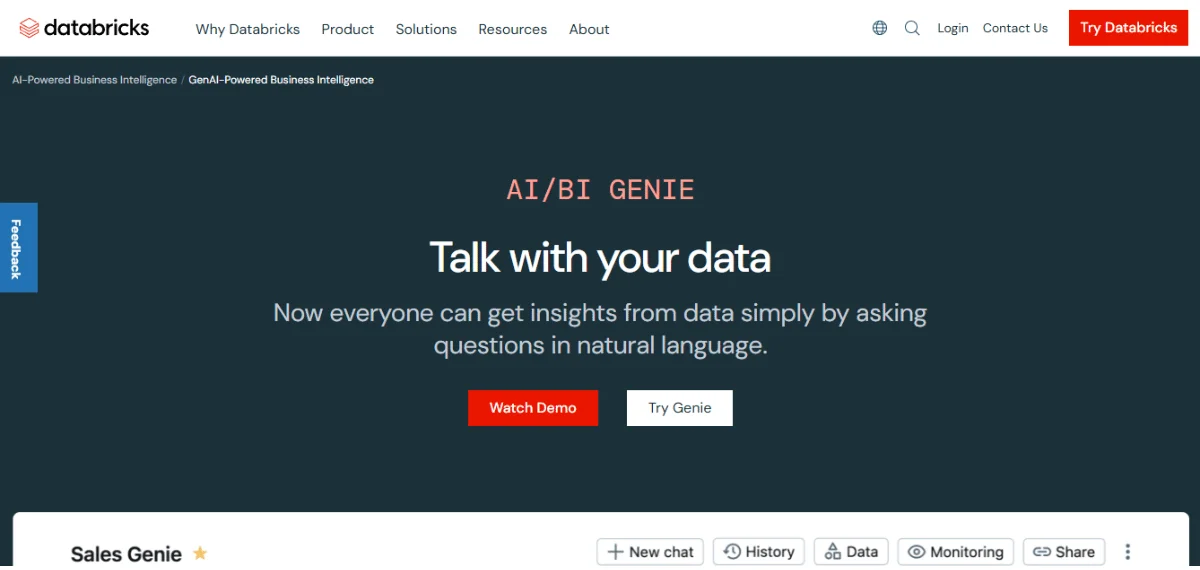
Databricks AI/BI Genie is a conversational analytics feature built into the Databricks Data Intelligence Platform.
Business users type questions in plain English, and Genie translates them into SQL, runs them against your data, and returns answers with visual aids such as charts and tables.
The tool uses Unity Catalog metadata and a compound AI system to interpret questions. Your domain experts can configure Genie spaces with datasets, sample queries, and guidelines that help Genie generate accurate answers.
Benefits of Using Databricks AI/BI Genie
Genie delivers the most when your Databricks environment is already well configured.
Here’s what you can expect:
- Faster Answers for Business Users: Your non-data members, such as marketing leads and ops managers, can ask a question and get answers in seconds, which means fewer tickets for your data team.
- Reduced Data Analyst Workload: When your analysts aren’t fielding repetitive queries, they can focus on forecasting, modeling, and pipeline work.
- Governed Data Access: Unity Catalog ensures your users only see authorized data, and security policies apply to every Genie query automatically.
- Dashboard Follow-Up Questions: The AI/BI dashboard can include an integrated Genie space, and your users can ask follow-up questions without creating new reports.
These benefits are real if your Databricks environment is mature. The challenge is that value depends on the upfront work your data team puts in.
Core Capabilities of Databricks AI/BI Genie
While these benefits explain why Genie matters, understanding the tool’s capabilities helps you identify the gaps you must fill when choosing a new tool.
You can expect the following capabilities from Databricks AI/BI Genie:
- Natural Language to SQL: When you type a question, Genie AI Databricks converts it into SQL, runs the query, and returns results. The accuracy of the results depends on how well your Unity Catalog metadata and Genie space instructions are defined.
- Compound AI System: Multiple AI components work together to interpret your question, pick the right visual accompaniments, and generate SQL, which reduces errors compared to a basic text-to-SQL approach.
- Genie Knowledge Store: Domain experts add sample queries, text guidelines, and column-level synonyms that help Genie understand your business terminology and write accurate multi-table queries.
- Benchmarks for Accuracy: You can create test questions with expected SQL answers and run them against your Genie space to measure accuracy over time.
- Genie Conversations API: The Databricks Genie API lets you embed Genie in Slack, SharePoint, Microsoft Teams, or custom apps, enabling your users to query data wherever they work.
Most of these capabilities require significant upfront setup by your data team, and the quality of results directly reflects that investment.
How Databricks AI/BI Genie Works
Let’s take a closer look at the architecture that enables Genie to deliver these AI/BI capabilities:
- Unity Catalog as the Foundation: Everything runs on Unity Catalog, which stores metadata, access controls, and governance policies.
- Genie Spaces: Domain experts create spaces by selecting tables, adding sample queries, and defining column-level synonyms. Each space serves a specific use case, like support metrics or AI retail data analytics.
- Query Generation and Self-Reflection: When you ask a question, Genie generates SQL, then self-reflects to check for errors before running it. Each response includes thinking steps that show how Genie interpreted your prompt.
- Trusted Assets: When Genie uses a parameterized sample query to generate a response, it marks the answer as “Trusted,” which gives your users extra confidence.
- Databricks Genie Cost Model: Genie comes included with your Databricks SQL entitlement at no extra license fee. You pay through SQL warehouse compute, which scales with query volume.
The architecture is solid for mature Databricks environments, but self-service analytics remains a challenge when your data team must constantly update Genie spaces for every use case.
Databricks AI/BI Genie vs. Other AI BI Tools
Most data analytics tools add AI on top of traditional BI, so they inherit the limitations of the underlying tools.
Here’s how Genie compares to other top AI and BI solutions:
Explainability of Results
Power BI and Tableau show results through dashboards and visualisations, but they don’t show calculation logic in plain language. Users must already understand the underlying data model to verify what they’re seeing.
Genie shows its reasoning steps and marks some answers as “Trusted,” which adds a layer of transparency.
Consistency in Answers
Looker grounds its answers in LookerML models, but a poorly maintained model produces inconsistent results just as readily as a poorly maintained knowledge store.
Genie relies on your data team to maintain knowledge stores and metadata. Its answers stay consistent with your organization’s definitions rather than drifting based on how different users phrase the question.
Depth of Analysis
ThoughtSpot’s Spotter handles natural language queries well but largely constrains itself to single-table or pre-modeled questions.
Genie operates across your full Databricks Lakehouse, which means it can draw on richer data relationships for more complex analytical questions.
Platform Lock-In
Snowflake’s Cortex Analyst queries data within Snowflake. For it to work with other data warehouses, you need custom tools and manual configuration.
Similarly, Genie only works with data in Databricks. If your organization uses Redshift, Snowflake, or BigQuery, you’ll need to incorporate the data from those warehouses in the Databricks Lakehouse first.
As you’ll notice, the pattern across most AI in BI tools is the same in that your data team carries the burden of making AI work for business users. This approach still poses a challenge.
Business Use Cases of Databricks AI/BI Genie
The real test of any analytics tool is what your team can actually accomplish with it.
Genie earns its keep in scenarios such as:
- Retail Sales Trends: Your merchandising lead can ask, “What were the top categories last quarter by region?” and Genie queries your sales tables and generates a chart without involving the data team.
- Customer Support Trends: Your support director wants to know which product lines drive the most escalated tickets, and Genie surfaces customer service patterns your static dashboard couldn’t show.
- Financial Reports: Your finance team can get a detailed breakdown in seconds when they request financial metrics, such as monthly revenue variance by cost center, without filing a ticket with the data team.
- Campaign Performance: Your marketing lead can get answers on common marketing metrics without waiting for a custom query, such as comparing conversion rates across channels for the last 90 days.
You can expect these use cases to work well when your data team has already configured the appropriate Genie spaces. If your teams want answers without months of setup, you’ll need to consider a different approach.

Is Databricks AI/BI Genie Right For Your Team?
Genie is a strong fit for organizations that run entirely on Databricks and have a data team with the capacity to build and maintain Genie spaces across business and technical departments.
Genie falls short in the ownership model. Every new use case requires your data team to create a space, annotate metadata, and write sample queries.
The setup cost never truly goes away. While Genie shows reasoning steps, it doesn’t always break down every metric into plain-language terms that non-technical users can independently verify.
Your team may still field the same trust question: “Can we rely on this number?”
If your goal is analytics that works more smoothly across warehouses and earns user trust without involving the data team constantly, Genie alone won’t get you there.
How Zenlytic Takes a Different Approach
Most AI analytics tools put the burden on your data team before business users see any value. Zoë, our AI data analyst, flips that model.
Zoë integrates with your Databricks warehouse (in addition to BigQuery, Snowflake, and Redshift), enabling your team to start asking questions on day one with no space configuration.
You only need to set up the base model for your semantic layer, and Zoë continues to learn your metric definitions and recommend improvements based on usage.
Here’s what that looks like in practice:
- Specialized AI Data Analyst: As our dedicated AI data analytics agent, Zoë handles the entire analytical workflow for your business users. She suggests follow-up questions, explains every calculation in plain language, and shows the full reasoning behind each answer. This detailed explainability ensures trust, meaning your team never has to use the data team to verify Zoë’s work.
- Clarity Engine for Automatic Trust: Our Clarity Engine combines the flexibility of SQL with a governed semantic layer that learns and improves with usage. As questions come in, it captures new metric patterns and recommends updates to eliminate the months of extensive upfront modeling that other tools require.
- Citations for Verifiable Answers: Every number Zoë returns links directly to its source table, column, and formula. Your business users can click any metric to view the full data lineage and verify the result.
- Memories for Repeatable Results: You only need to define a metric once, and Zoë delivers the exact same answer every time that question comes up without conflicting outputs based on who asked the question.
- Clarity Admin for Data Team Oversight: Your data team gets a live view of which metrics matter most. When someone asks about a concept that hasn’t been formalized yet, Zoë logs it automatically, and your team decides when to promote it.
These capabilities and results aren’t hypothetical. Zenlytic clients have successfully used our platform. Check out this testimonial from Amanda Yan, Head of Data at J.Crew and Madewell:
“We’ve tried every AI-powered platform out there. But our self-serve users still asked us to verify everything. Zenlytic solves this. Once our end users understand the results, they trust the results.”
Your team can be among the early adopters of a fundamentally different approach to AI analytics, one where “analytics agent” is quickly becoming the industry standard.
As the shift unfolds, you have the opportunity to lead the way rather than follow it.
Schedule a free demo now to see how Zoë can transform your data analytics processes.
Frequently Asked Questions (FAQs)
Here are the most common questions about Databricks AI/BI Genie:
Does Databricks AI/BI Genie Support Multi-Cloud Environments?
Genie runs on AWS, Azure, and Google Cloud Platform through Databricks. However, it only queries data stored in Databricks.
If your organization also uses Snowflake or BigQuery, you’ll need to integrate the data for those warehouses first.
Can Databricks AI/BI Genie Work With External BI Tools?
Not directly. Genie operates within the Databricks ecosystem, not as a standalone connector for tools such as Tableau or Power BI.
You can embed Genie in custom apps via the Databricks Genie API, but it won’t query data outside Databricks unless you first integrate that data into the Databricks Lakehouse.
Can Databricks AI/BI Genie Support Real-Time Analytics?
Genie queries your SQL warehouse in real time and returns results based on whatever data is currently in the system.
However, freshness depends on how frequently your pipelines refresh, since Genie doesn’t offer its own streaming layer.
Can Databricks AI/BI Genie Support Custom Semantic Models?
Yes. You can define semantic metadata in metric views through Unity Catalog and add space-level metadata like column synonyms and sample queries.
The Databricks Genie documentation covers the full setup for custom models, making it easier for organizations to customize different parameters.
Conclusion
Databricks AI/BI Genie brings conversational queries to teams committed to the Databricks ecosystem. But ongoing Genie space maintenance, single-platform limitation, and the lack of built-in answer verification leave your data team carrying most of the load.
Zoë removes that burden by connecting seamlessly to every major warehouse, tracing every answer back to its source through Citations, and locking in consistent definitions through Memories.
Book a demo today to transform your data analytics with Zoë.